
Printable grade charts
Free PDF grade charts for tests of 5 to 100 questions, an EZ grader chart that covers every test from 1 to 50 questions, and a grading scale chart with GPA. Each chart fits on one page and lists every score with its percent and letter grade.
Updated October 13, 2026 · Standard scale: A 90%, B 80%, C 70%, D 60%, passing 60%
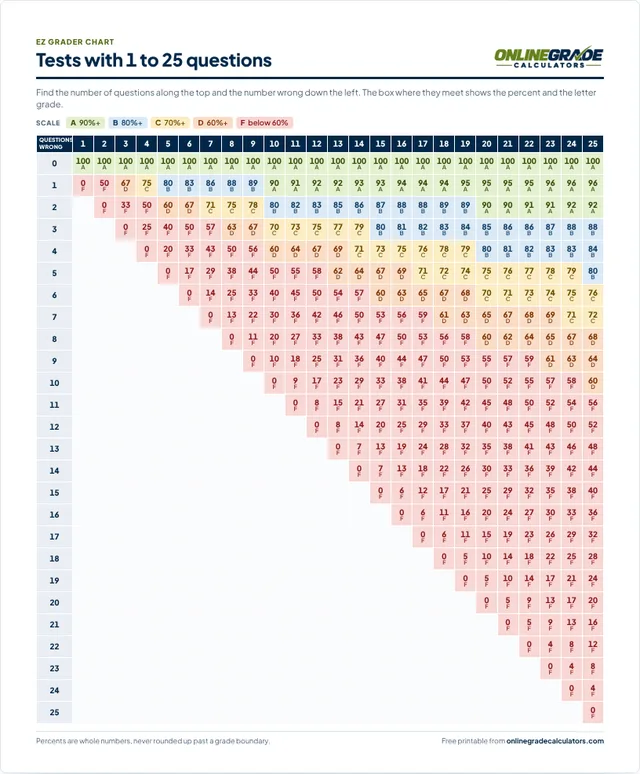
EZ grader chart, 1 to 50 questions
Two pages. Questions run across the top and wrong answers down the side, with the percent and letter grade in every box.
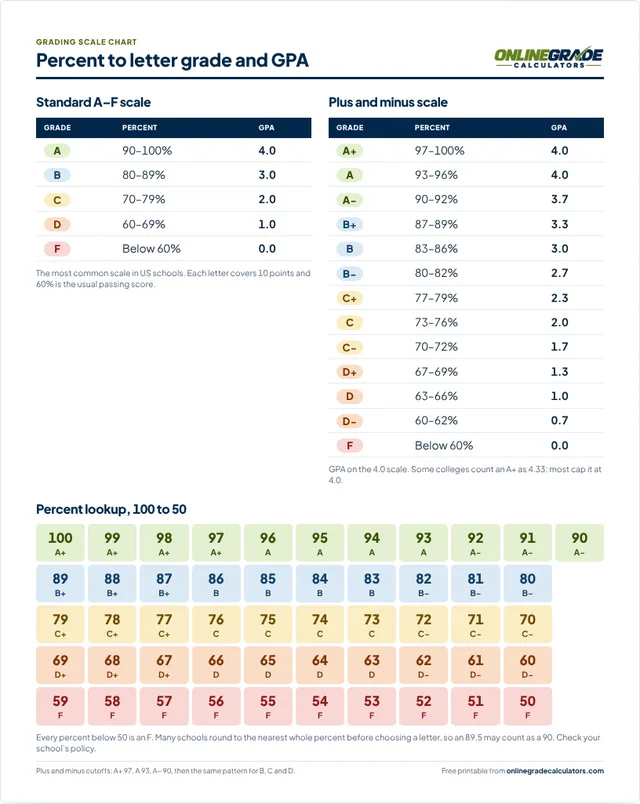
Grading scale chart with GPA
The standard and plus/minus scales with 4.0 GPA points, and a percent lookup from 100 down to 50. Good for a classroom wall or a parent letter.
Your own chart, any length
Open the grade calculator, add the test name and class, switch to plus and minus or your own cutoffs, allow half points, then press Print / PDF.
Grade charts by number of questions
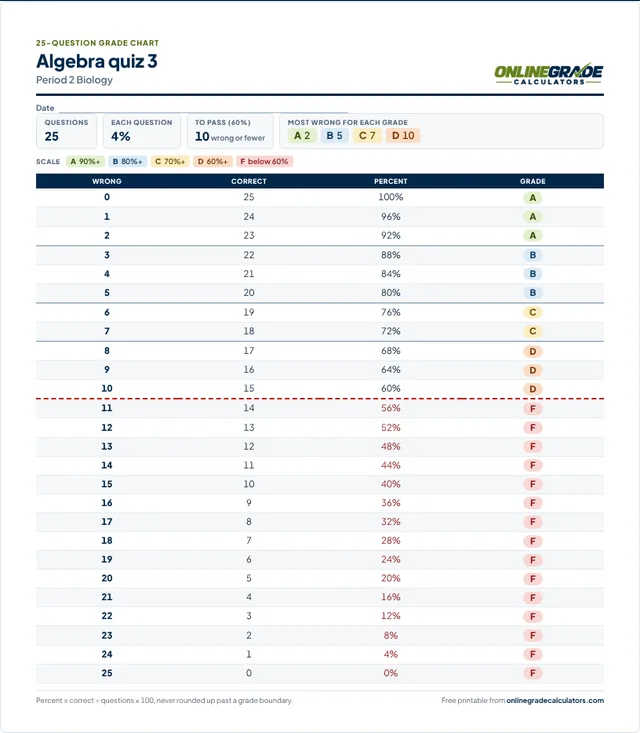
One page per test length, with every possible score from all correct to all wrong. A dashed red line marks where scores drop below 60%, and a thicker line marks each change of letter grade. Use Customize to change the scale or add a title before printing.
- 5questions
Each question: 20%
A: no misses
Pass: up to 2 wrong
- 8questions
Each question: 12.5%
A: no misses
Pass: up to 3 wrong
- 10questions
Each question: 10%
A: up to 1 wrong
Pass: up to 4 wrong
- 12questions
Each question: 8.33%
A: up to 1 wrong
Pass: up to 4 wrong
- 15questions
Each question: 6.67%
A: up to 1 wrong
Pass: up to 6 wrong
- 16questions
Each question: 6.25%
A: up to 1 wrong
Pass: up to 6 wrong
- 20questions
Each question: 5%
A: up to 2 wrong
Pass: up to 8 wrong
- 25questions
Each question: 4%
A: up to 2 wrong
Pass: up to 10 wrong
- 30questions
Each question: 3.33%
A: up to 3 wrong
Pass: up to 12 wrong
- 35questions
Each question: 2.86%
A: up to 3 wrong
Pass: up to 14 wrong
- 40questions
Each question: 2.5%
A: up to 4 wrong
Pass: up to 16 wrong
- 45questions
Each question: 2.22%
A: up to 4 wrong
Pass: up to 18 wrong
- 50questions
Each question: 2%
A: up to 5 wrong
Pass: up to 20 wrong
- 60questions
Each question: 1.67%
A: up to 6 wrong
Pass: up to 24 wrong
- 75questions
Each question: 1.33%
A: up to 7 wrong
Pass: up to 30 wrong
- 80questions
Each question: 1.25%
A: up to 8 wrong
Pass: up to 32 wrong
- 100questions
Each question: 1%
A: up to 10 wrong
Pass: up to 40 wrong
How to use a grade chart
- Count the wrong answers on the test. If you counted correct answers instead, use the Correct column.
- Find that number in the Wrong column of the chart for your test length.
- Read across for the percent and the letter grade, and write both on the paper.
The box at the top of each chart also lists the most wrong answers allowed for each letter, so a quick look tells you whether a paper is an A or needs a closer check.
Which chart should I print?
Print the chart for your test length when you grade one test many times, like a weekly 20-question quiz. Print the EZ grader chart when your quizzes change length from week to week: one sheet covers every test from 1 to 50 questions. Print the grading scale chart to explain grades to students and parents, or to convert a percent from any source into a letter grade and GPA.
For a test with a different number of questions, half points, a 65% passing score or a plus and minus scale, use the grade calculator and press Print / PDF. For assignments where questions are worth different points, use the points grade calculator. The grading scales guide explains how different schools set their cutoffs.
Printing tips
- Print at 100% (Actual size). Every chart fits one US Letter or A4 page. A 100-question chart still fits on one page; with half points it runs to two.
- Colour helps, but every box also prints its letter, so black-and-white copies work.
- Slip the chart into a sheet protector or laminate it, and keep it with your answer keys.
Questions about the printable charts
Can I share these charts with other teachers?
Yes. They are free to print, copy and share with students and colleagues. Please link to this page rather than re-uploading the files, so everyone gets the latest version.
Can I use my school’s grading scale?
Yes. In the grade calculator, open Grade scale to switch to plus and minus or type your own cutoffs and passing score, then press Print / PDF. The printed sheet uses your scale.
Why does 26 out of 29 show 89% and not 90%?
26 ÷ 29 = 89.66%, which is a B when an A starts at 90%. Rounding it up would print 90% next to a B, so the charts never round a percent up past a grade boundary. Every other percent is rounded to the nearest whole number. If your school rounds 89.5 up to an A, turn on Show decimals in the grade calculator and apply your own rule.